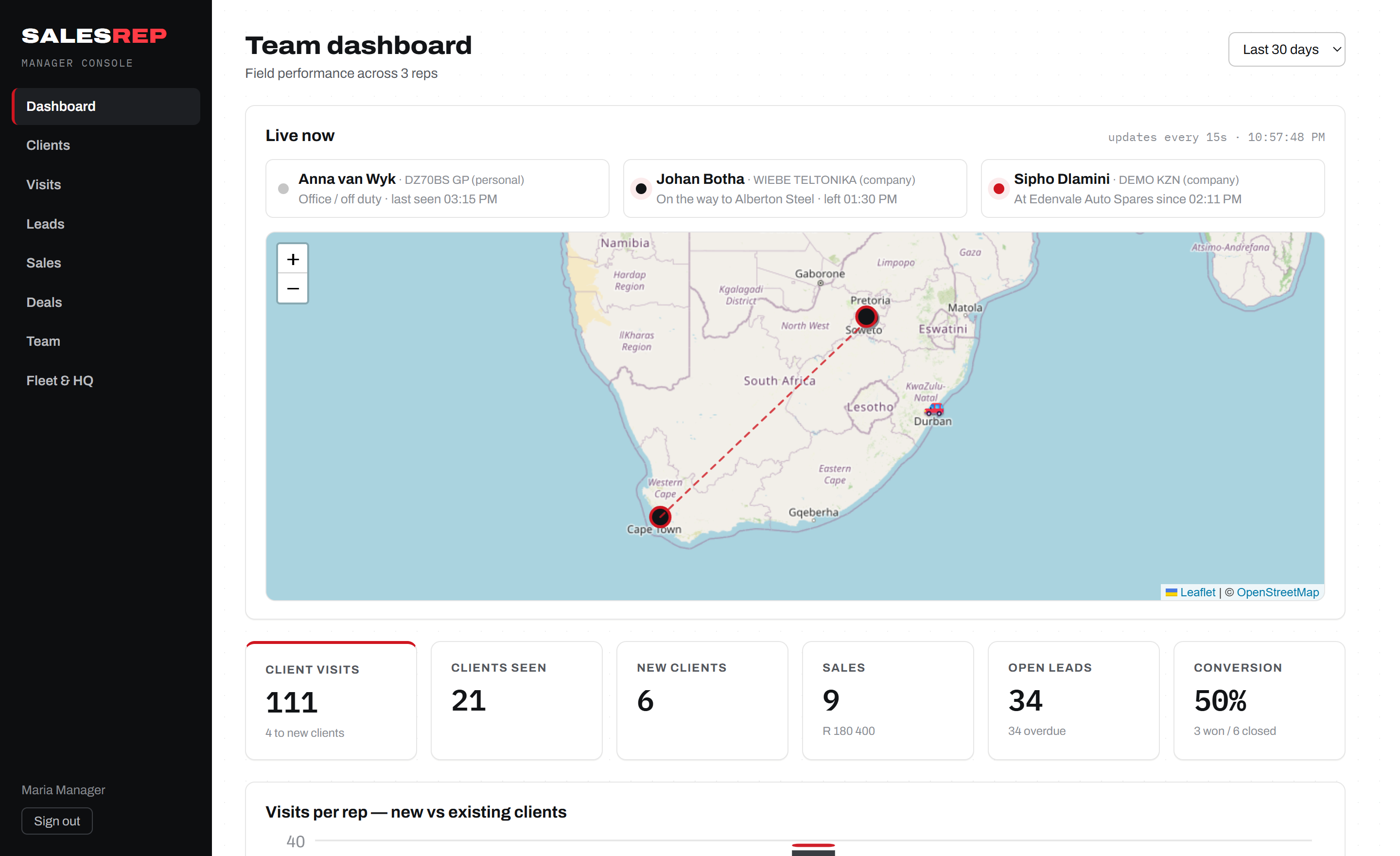
No more "where are you?"
The live map answers the question before it's asked. On-duty trips are visible; private trips stay private — by design.
SalesRep gives every rep a planned route on their phone — and gives you a live map of visits, leads, sales and vehicles as the day unfolds. Built for teams that sell on the road.
A route plan in SalesRep isn't a spreadsheet — it's a living schedule. The rep builds it, the phone drives it, the console reports it. No step is typed twice.
The rep (or manager) picks clients from their own book and orders the stops. The plan builder only offers clients they're allowed to visit — their own and unassigned ones.
One tap starts a business trip — choose a company vehicle or your own. GPS tracking starts, and the manager's live map shows who's heading where. Private trips stay private.
The app knows when you're at a client and offers the check-in. Checking in ends the trip automatically. Log the visit outcome, an order, or a new lead — right there.
Check out and the home card advances to the next stop. At day's end the console has the full picture: route driven, clients seen, sales made, leads due for follow-up.
Sipho Dlamini covers the East Rand for a parts distributor. His manager, Maria, runs three reps from the console. Here's an ordinary Tuesday — exactly as SalesRep handles it.
Over coffee, Sipho opens the plan builder and lines up six stops: four regulars, one client he hasn't seen in 60 days (the app flagged the gap), and a follow-up on a hot lead. He drags them into driving order and the day map draws his route.
6 planned visits · day map readyHe taps On my way, picks the KZN demo bakkie from the vehicle list, and pulls out. The app goes on duty and starts a GPS trail. If this were a private errand he'd start a private trip instead — his position stays hidden from the dashboard.
Trip started · GPS on dutyMaria's dashboard shows the morning taking shape: Sipho — on the way to Edenvale Auto Spares, Johan already at his first stop, Anna off duty at the office. No phone calls, no "where are you?" WhatsApps.
As he parks, the home card flips to You're at Edenvale Auto Spares — check in? One tap: visit open, trip closed, timestamp logged. He walks in with his hands free and his last-visit notes on screen.
Auto place-awareness · check-in ends tripCounter restock agreed — he logs a R4,850 sale against the visit, types a one-line outcome, checks out. The home card advances: Next up — Germiston Gasket Co.
Sale logged · plan advancesA new fitment centre he's never seen. He taps Add client here — GPS pins the location, he types the name, and the client lands in his book automatically. It'll be on a future route plan.
New client · auto-assigned to SiphoThe app has been nagging about an overdue follow-up. He calls, they bite, and he moves the lead into the deal pipeline. Reception in the industrial park is dead — everything queues in the offline outbox and syncs later.
Deal opened · queued offlineMaria drills into Sipho's day: 5 of 6 planned visits done, the route he actually drove, one new client, one sale, one deal opened. The skipped stop rolls forward. Friday's numbers are already in the dashboard — nobody writes a report tonight.
Reps get a phone app that works with no signal. Managers get a console that never needs a status meeting. Both look at the same live data.
The live board shows every rep's state — at a client, on the way, off duty — over a map of your territory, refreshed every 15 seconds. KPIs for visits, new clients, sales, open leads and conversion sit right below.
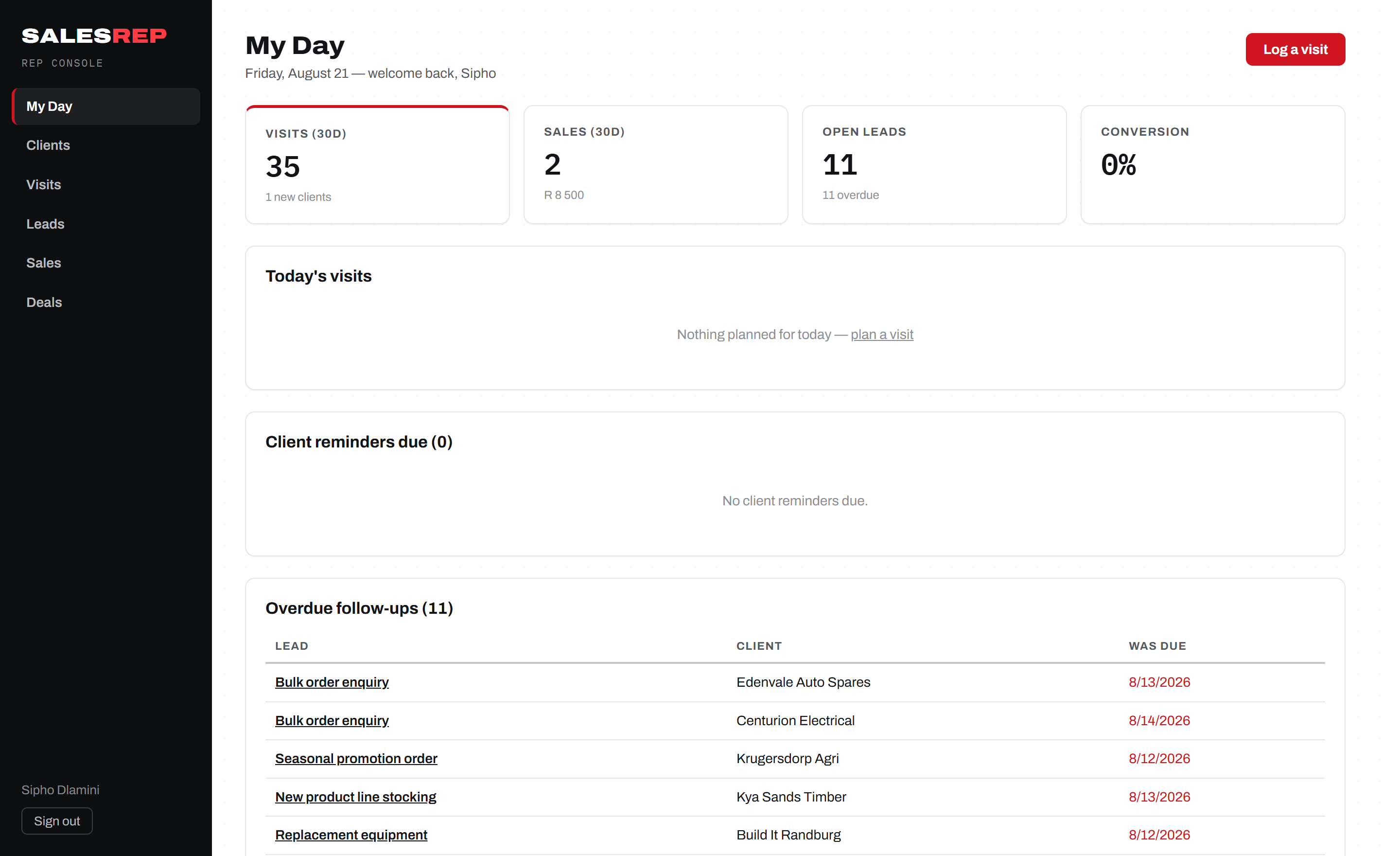
My Day shows today's planned visits, overdue lead follow-ups, and client reminders. One button logs a visit. The same view lives on the phone, offline.
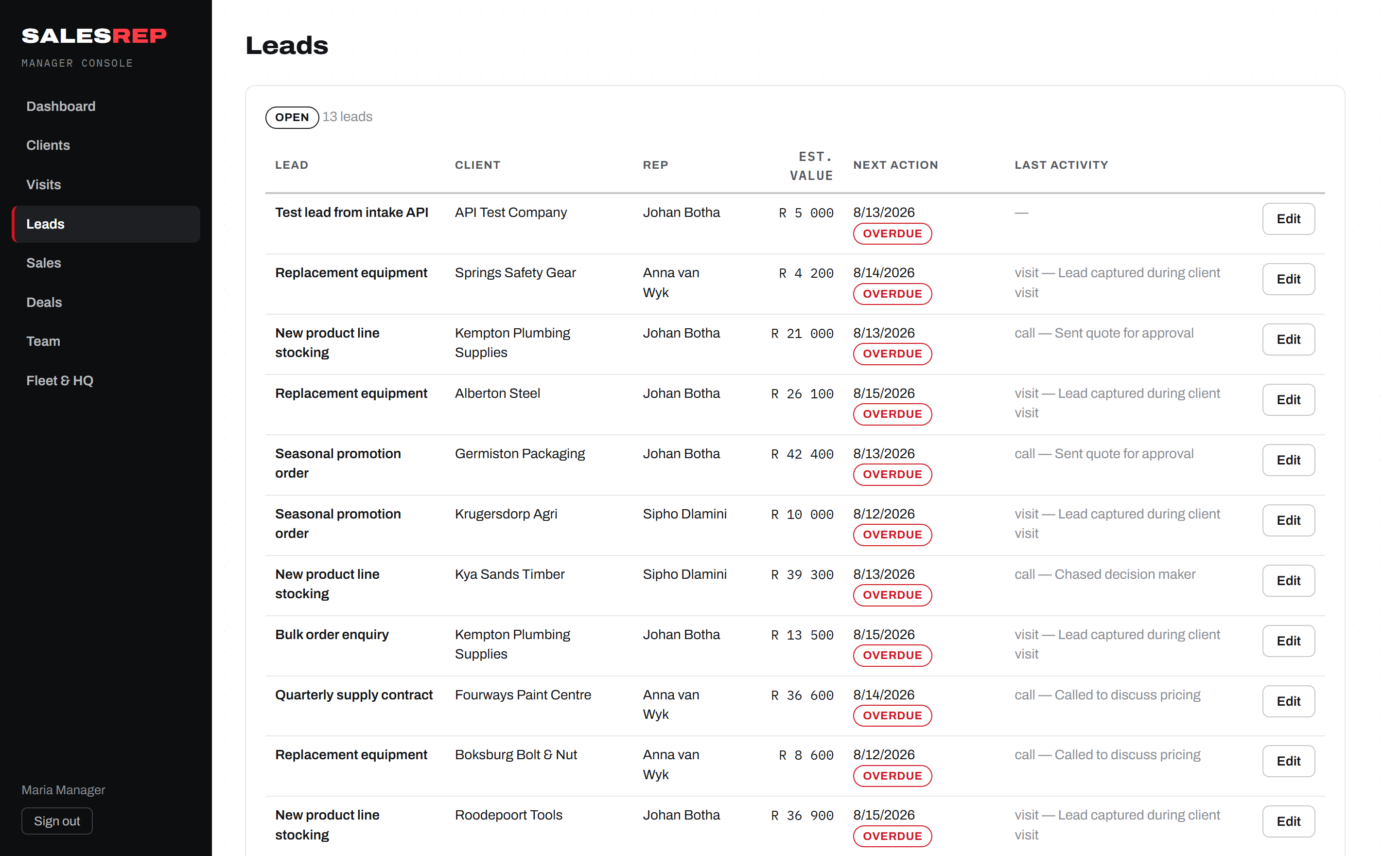
Every lead carries a next action and a date. Miss it and it goes red — on the rep's phone and the manager's board. Won leads flow into a deal pipeline with values and stages.
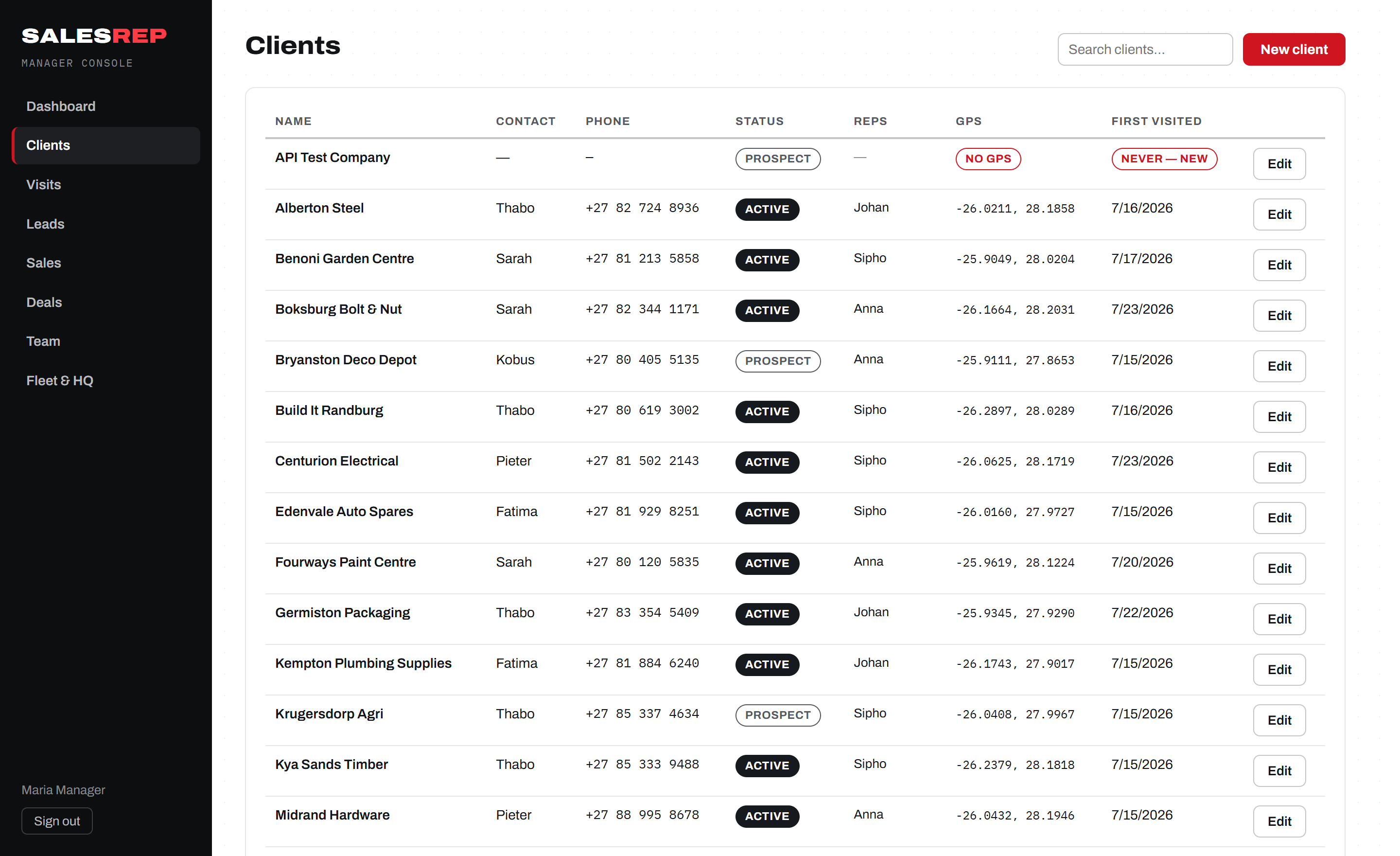
Every client holds its GPS pin, visit history, sales and notes. Visits log who, where, when and what came of it — with new-client visits counted separately so prospecting shows up in the numbers.
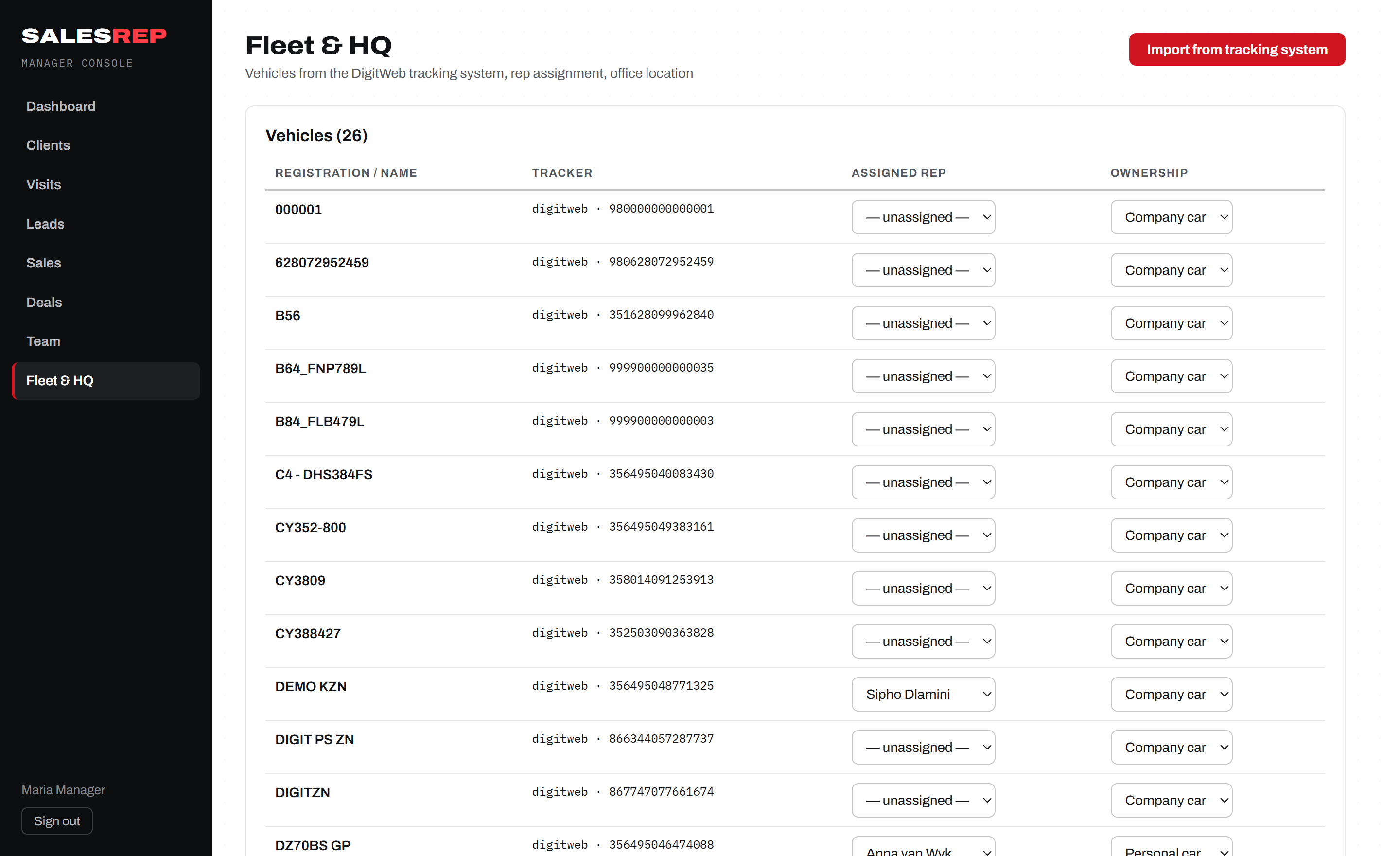
SalesRep imports vehicles straight from your DigitWeb tracker account and overlays live vehicle GPS on the dashboard. Reps pick a vehicle when they head out, so trips, vehicles and visits all join up.
The SalesRep app (Android & iOS) is offline-first: everything works with zero signal and syncs itself when the network returns. It locks with your fingerprint, tracks only on duty, and turns arriving at a client into a single tap.
Screens are illustrative of the SalesRep mobile app. Console screenshots above are the live product.
The live map answers the question before it's asked. On-duty trips are visible; private trips stay private — by design.
Visits, sales, conversion and new-client counts land in the dashboard as they happen. Friday's numbers exist by Friday lunch.
The plan builder and reminders surface clients nobody has seen in weeks — before they quietly move to a competitor.
Every lead has a next action and a date; overdue ones go red on both the phone and the console until they're won or lost.
Industrial parks, farms, basements — the app never depends on signal. Everything queues and syncs itself later.
Biometric app lock on phones, role-based console access, and manager-controlled team accounts with instant deactivation.
Create your reps on the Team page and load your client book — or let reps add clients from the field with a GPS pin. New field clients auto-assign to whoever created them.
Reps sign in on their phones, switch on app lock, and pull their client book down for offline use. If you run DigitWeb trackers, import the fleet in one click.
Build Monday's plan in the plan builder. From the first "On my way", the dashboard is live — visits, sales and leads flow in without anyone filing a report.
Every plan includes the mobile app, the console, and offline sync. Pay monthly, cancel anytime. 14-day free trial on all plans.
Prices are launch pricing and may change. Billing in ZAR. No per-client or per-visit charges — ever.
Tracking only runs while a rep is on duty, and reps can mark any trip as private — a private trip's position is hidden from the dashboard entirely. Off duty, the app doesn't track at all. It's built to prove work happened, not to surveil lunch breaks.
Everything keeps working. Visits, sales, new clients and GPS points queue in an on-device outbox and sync automatically the moment the phone finds data again. Reps can work a full day offline.
Yes — SalesRep integrates with DigitWeb trackers. Import your fleet in one click, see live vehicle positions on the same dashboard as your reps, and let reps pick the vehicle they're driving when they head out.
Most teams are live in an afternoon: create rep accounts, load or field-capture clients, install the app, plan the first routes. There's no hardware to install and nothing to configure on the phones beyond signing in.
Yes. Managers create reps, reset passwords, and deactivate accounts instantly — deactivation kills the phone's session immediately. Clients are always owned by a rep, so coverage never falls through the cracks.
Put your field team on SalesRep this week — 14-day free trial, live in an afternoon, cancel anytime.
Start your free trial